



We’ve all been there. You have a vision, a spark of an idea, and you can almost see the finished picture in your mind. But bridging the gap between that idea and a final, polished image can sometimes feel like a journey. Well, we hope that journey is about to get a whole lot smoother. We’re excited to pull back the curtain on Tengrai 2.0 release, a comprehensive update designed to give you more creative power, finer control, and a more intuitive workflow.
This isn’t just a fresh coat of paint. We’ve re-imagined core parts of the platform to help you bring your ideas to life more efficiently and with more artistic flair than ever before. Let’s dive in.
Meet the new family: Selena, Quantum, and Hamilton
To bring more clarity and consistency to your creative process, we’ve moved to a named system for our generation models.
The text-to-image model you’ve come to know and love is now officially Selena. It’s the same fast and reliable engine you’re used to, perfect for getting your ideas down quickly. Our more advanced model is now streamlined into a single, powerful offering called Quantum.
And now, for the main event. We’re thrilled to introduce Hamilton, our new flagship generation model.

Hamilton is our most powerful and nuanced image generator. It creates images at higher resolution, meaning your creations are larger, sharper, and packed with more detail right from the start.
Hamilton styles
But Hamilton is more than just pixels; it’s about artistic control. We’ve introduced several styles to give your generations a more distinct personality.
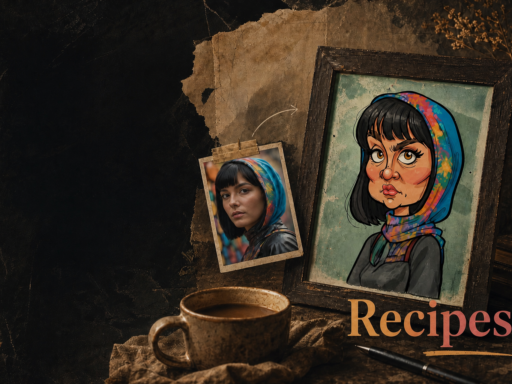
Ever wanted to create a truly personalized coloring book for your kids? Now you can more easily. Just describe any scene you can imagine, maybe “a friendly dragon having a tea party with a robot“, and the coloring-book style generates a clean, simple outline design, ready for an afternoon of creative fun. For moments that call for a more personal touch, the hand-sketch style provides a beautifully organic feel, as if an artist had just put pencil to paper and sketched a first draft. It’s perfect for concepts and storyboards where you want to escape the digital polish and capture a more human, artistic element.
Beyond that, you can build charming, tactile worlds that look sculpted from clay with the plasticine style, design intricate patterns with the stained-glass style, or capture the gritty realism of classic film using the photographer style. This is just a glimpse of the artistic identities you can now give your creations, moving seamlessly from whimsical sketches to photorealistic masterpieces.


New controls in Tengrai 2.0
We’ve also added new controls to help you fine-tune your results more efficiently. A new “Express to Elaborate” slider lets you decide whether you want a quick concept in a few seconds or a finely detailed masterpiece that takes longer. To complement this, we’ve introduced seed control. Think of the seed as the unique starting point, the “fingerprint” for the initial noise pattern from which your image is shaped.
This gives you the power of reproducibility, enabling a more strategic workflow. You can now use the fast “Express” setting to explore different seeds until you find a composition and layout that resonates with your vision. Once you do, simply use that exact same seed with the “Elaborate” setting to render that image again in full, glorious detail. It also allows you to take a result you like, keep the seed, and experiment by only changing a small part of the prompt, knowing the rest of the composition will remain consistent.
Your creative co-pilot has landed: Introducing Photo Pilot
What if you could edit your images just by describing the changes you want? With the new Photo Pilot, you can.
Photo Pilot is the first iteration of a new text-based image editing tool, and it can be a game-changer for refining your work. Instead of exporting your image to another program for tweaks, you can now simply type your instructions. Do you want to change the mood, alter an object, or even transform the entire style of an image? Just tell Photo Pilot.


You can add text to designs.


Remove objects or persons, photo retouch.


You can even extract depth maps or other features from the input images.


This new feature in Tengrai 2.0 works on both newly generated images and ones you upload, eliminating the need for external tools and keeping you in your creative flow.


The Generation Hub in Tengrai 2.0
Great tools deserve a great workspace. We’ve heard your feedback and have consolidated all our features into a single, unified interface called the Generation Hub.

Less clicking, more creating. The new Hub brings image generation with the three named models, Photo Pilot editing, the Upscaler, Detailer, Face Refiner, and all our other tools together in one logical place. The redesigned home page and dashboard guide you straight into the action, making it easier than ever to find the tool you need and start creating.
We’ve also added in Tengrai 2.0 a much-requested Artwork Manager, so you can now organize your masterpieces into folders, making it easier to manage your projects. Your computer’s “Downloads” folder can finally breathe a sigh of relief.
We hope Tengrai 2.0 is more than an update and it becomes the start of a new chapter. It’s about giving you the power of our best models, the precision of intuitive editing, and the pleasure of a seamless workflow. We believe that technology should be a partner in your creativity, not a barrier.
We can’t wait to see what you create. Log in to experience Tengrai 2.0 today.
Got a creation you’re particularly proud of? Share it with our creative community on Facebook! We’ll be also featuring our favorites.



Gratulálok az új fejlesztésekhez. A Hamilton “gondolkozása” nagyon jó, de sajnos a technikai minőség még mindig elmarad az általam elvárttól. Fotográfus vagyok és más generátort is használok, aminek a gondolkodása nem ennyire jó, viszont a technikai minőség (részletgazdagság, textúra) kiváló. A képminőség javítása fontos szempont lehet a következő fejlesztésben. Jó és eredményes munkát kívánok!